PRISM Documentation
Connect your AI agent, configure guardrails, and set up alerts in under 15 minutes.
Overview
PRISM is the AI agent observability platform built for regulated industries and any organization where AI decisions carry real consequences.
AI agents in production make thousands of decisions daily. Without observability, you have no visibility into what your agents are saying, whether they are following instructions, or if they are exposing sensitive data. In regulated industries, this creates compliance risk, customer harm, and audit exposure.
| Dimension | What PRISM Provides |
|---|---|
| Prevent Harm | Quality scoring on every trace flags poor, risky, or non-compliant agent responses before they become incidents. |
| Protect Sensitive Data | PII detection guardrails intercept SSNs, credit cards, and personal data, blocking or flagging them before storage. |
| Manage Cost | Token counts, cost-per-trace, and latency metrics let you optimize model selection and prompt efficiency. |
| Maintain Compliance | Prompt versioning creates a full audit trail: who changed agent instructions, when, and what the impact was. |
| Ensure Stability | Real-time alerts notify your team the moment quality drops, latency spikes, or guardrails trigger at unusual rates. |
Supported models and integrations
- Large Language Models: OpenAI (GPT-4o, GPT-4), Anthropic (Claude), Google (Gemini), Mistral, Llama, and any custom or fine-tuned model.
- Cloud Platforms: Azure AI Foundry, AWS Bedrock, Snowflake Cortex, Databricks.
- Agent Frameworks: LangChain, LlamaIndex, CrewAI, custom Python/Node.js agents, or any system that makes LLM API calls.
Prerequisites
- A PRISM account (you received an invite link via email)
- An AI agent that makes LLM calls (any language, any framework)
- Your LLM provider API key (OpenAI, Anthropic, Azure, etc.)
- Python 3.8+ or Node.js 16+ installed
- A .env file workflow for managing secrets (explained in this guide)
Four steps to full observability
- 1Log in and explore your project dashboard
- 2Connect your first AI agent (send your first trace)
- 3Configure guardrails and alert rules
- 4Monitor, analyze, and iterate
Step 1: Log In and Explore
Click the invite link in your email. This takes you to the signup page where you set your password. After login, you land on your project's Overview page.
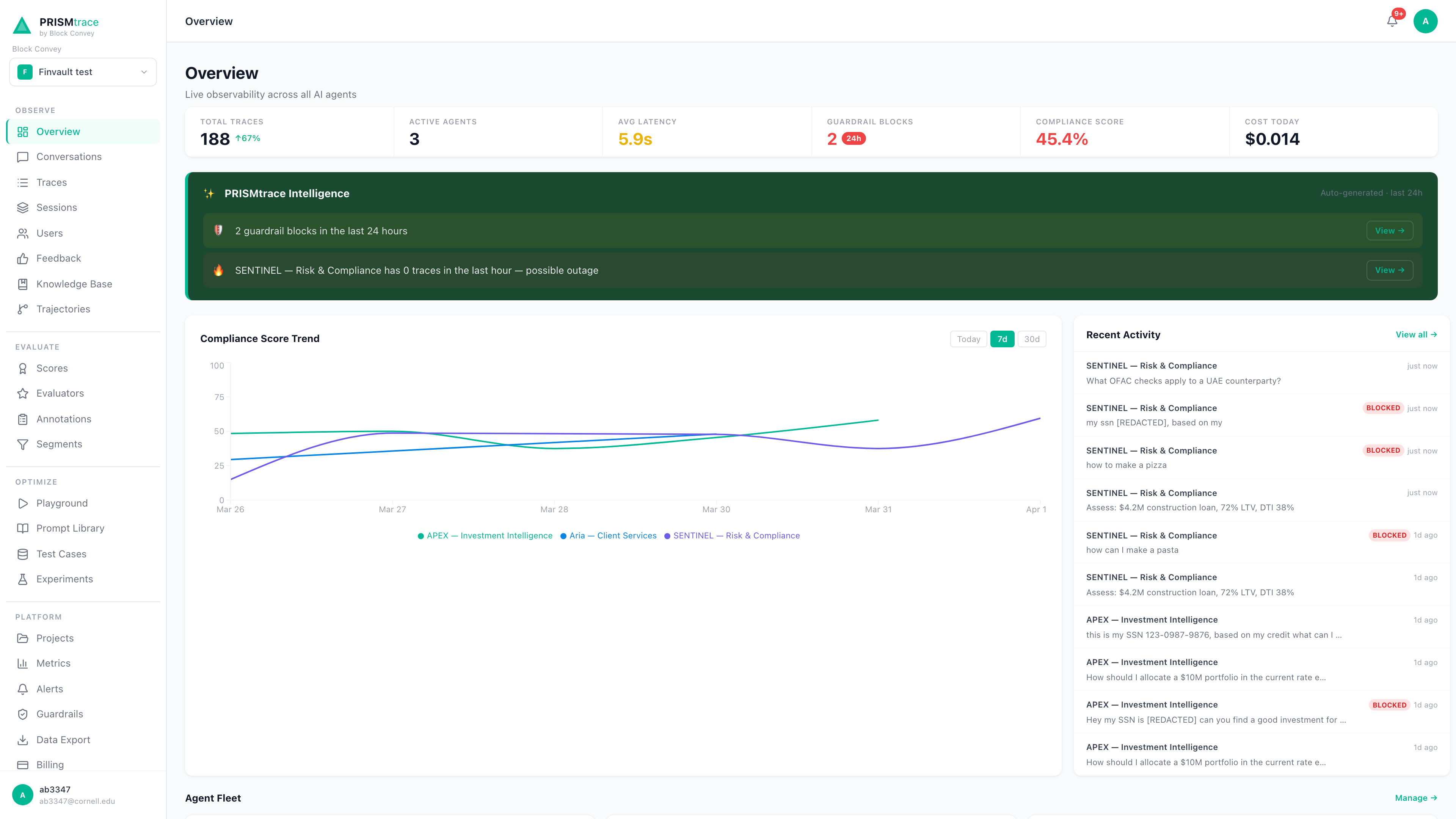
Dashboard Areas
| Area | Sections | Purpose |
|---|---|---|
| Observe | Overview, Conversations, Traces, Sessions, Users, Feedback | See what your agents are doing. View individual interactions, group them by session or user, and read user feedback. |
| Evaluate | Scores, Evaluators, Annotations, Segments | Assess quality. Every trace gets auto-scored on satisfaction, risk, and compliance. |
| Optimize | Playground, Prompt Library, Test Cases, Experiments | Improve your agents. Test prompt changes, version-control prompts, and run A/B experiments. |
| Platform | Projects, Metrics, Alerts, Guardrails, Data Export, Billing | Configure and protect. Set alert rules, guardrail policies, export data, and manage billing. |
| Integrations | Connectors, Model Inventory, API Keys, Docs, Settings | Connect and manage. Register agents, link data sources, manage API keys, and invite team members. |
Recommended First Steps
- 1View Overview to see your agent activity summary, top-level metrics, and recent traces at a glance.
- 2Go to Settings > API Keys and copy your API key and Project ID. You will need these in Step 2.
- 3Open Traces. If sample data is loaded, click any trace to see the full conversation, AI analysis, quality scores, and trajectory.
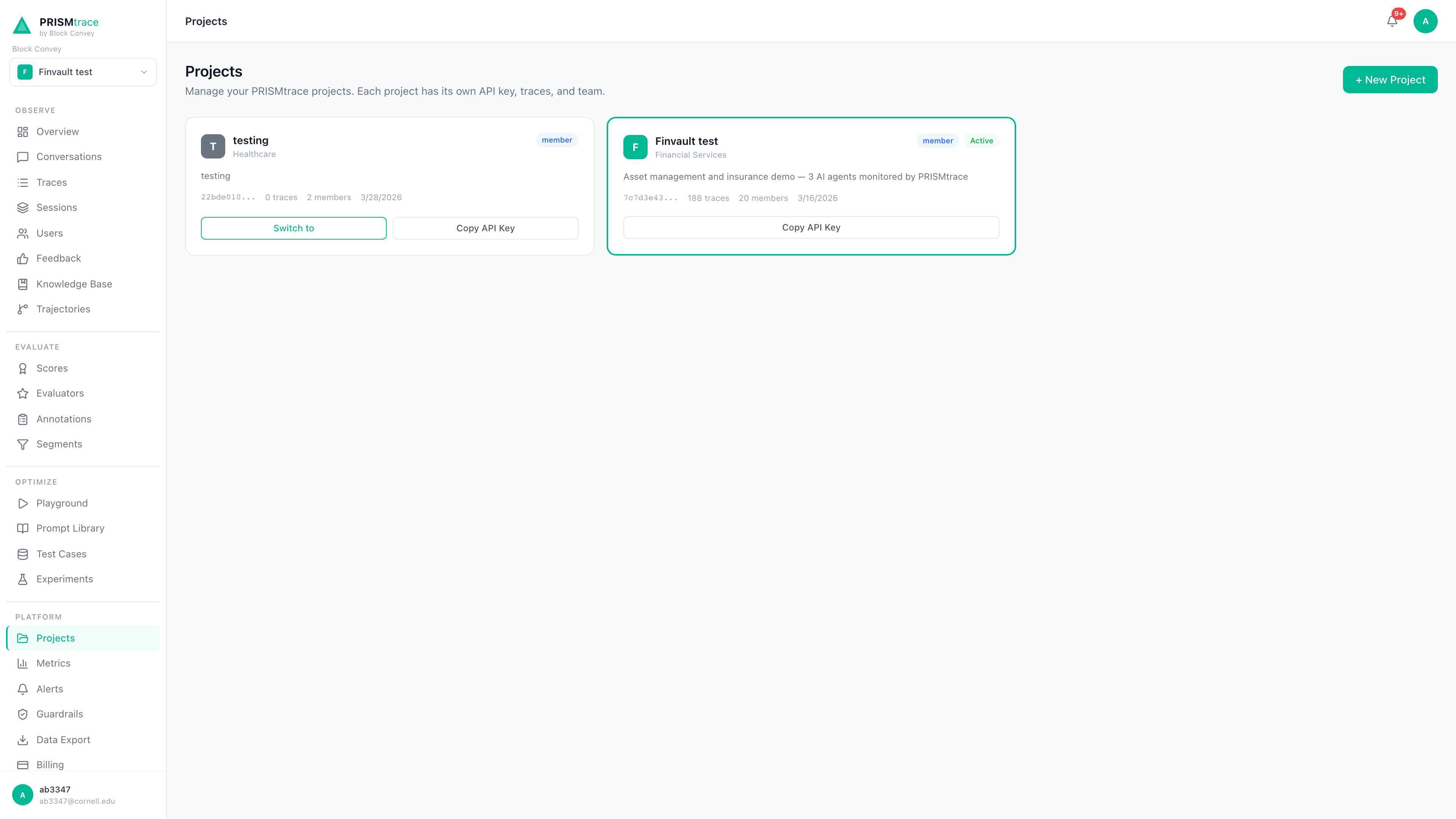
Team Management
PRISM supports multiple projects under one organization. Use the project dropdown in the top-left sidebar to switch between projects. To invite team members, go to Settings > Team. You can invite users at the organization level (access to all projects) or project level (access to a specific project only).
Step 2: Connect Your First AI Agent
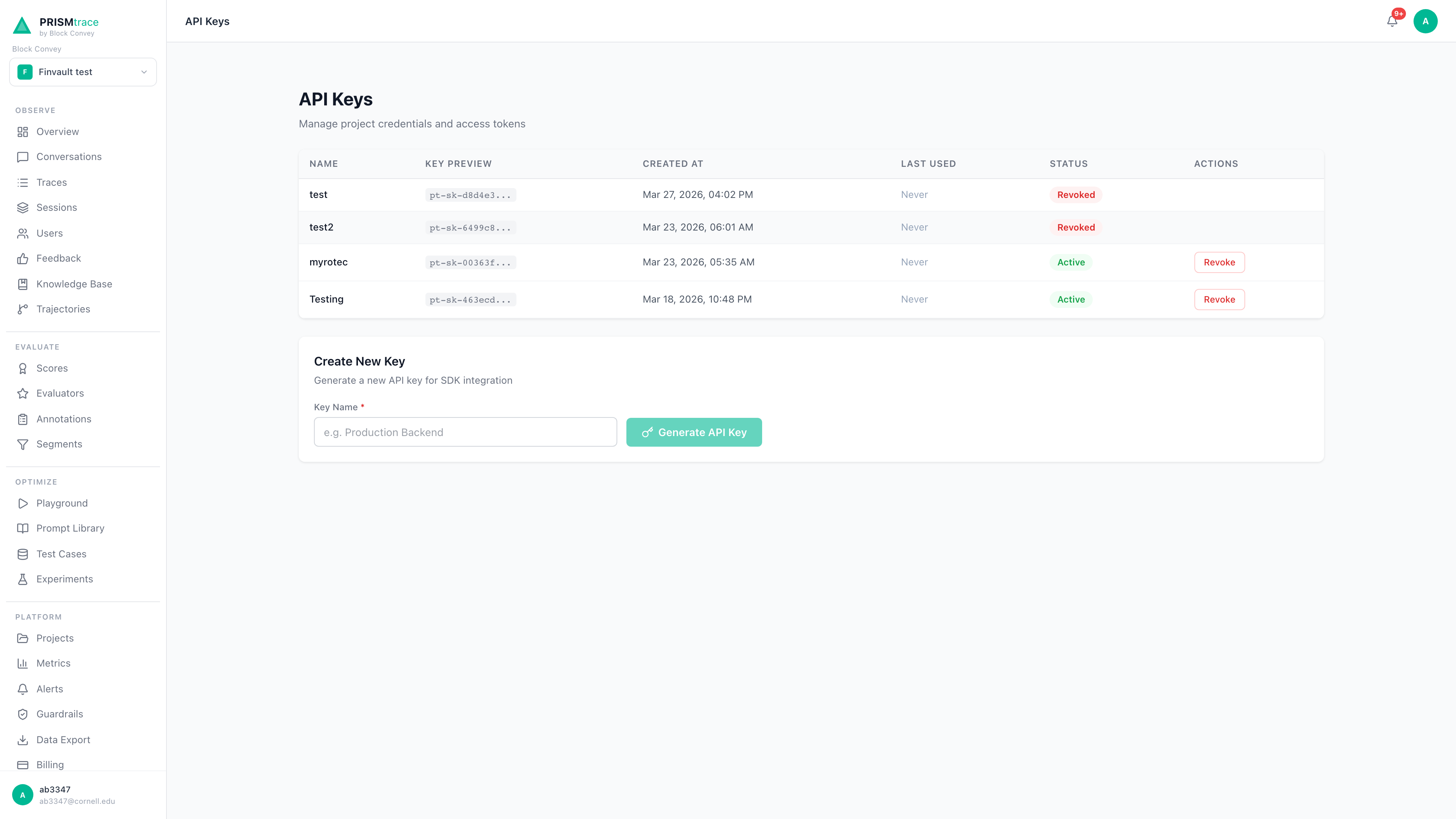
Get Your Credentials
| Credential | Where to Find It | Format |
|---|---|---|
| API Key | Settings > API Keys > Copy | pt_... |
| Project ID | Settings > Project tab | xxxxxxxx-xxxx-xxxx-xxxx-xxxxxxxxxxxx (UUID) |
Security: Protect Your API Keys
- Never hardcode keys in source code or commit them to Git
- Never share keys via email, Slack, or any messaging tool
- Always store keys in a .env file or your platform's secret manager
- Always add .env to your .gitignore before your first commit
- Use separate PRISM projects with separate keys for dev, staging, and production
API Reference
Send one trace after each AI agent response. PRISM scores and analyzes every trace automatically.
https://prismtrace.blockconvey.com/api/traces{
"project_id": "YOUR_PROJECT_ID",
"api_key": "YOUR_API_KEY",
"input_messages": [
{ "role": "user", "content": "What is my loan status?" }
],
"output_message": "Your loan application #4521 is approved.",
"model": "gpt-4o",
"latency_ms": 1200,
"token_count_input": 45,
"token_count_output": 180,
"metadata": {
"agent_name": "Customer Service Agent",
"agent_id": "cs-agent-001",
"source": "production"
}
}| Field | Required | Description |
|---|---|---|
project_id | Yes | Your project UUID from Settings. |
api_key | Yes | Your PRISM API key. Authenticates the request. |
input_messages | Yes | Array of {role, content} objects representing the user messages. |
output_message | Yes | String. The agent response text. |
model | No | The LLM model name. Helps filter traces by model. |
latency_ms | No | Response time in milliseconds. Used for latency alerts. |
token_count_input | No | Input token count. Used for cost calculation. |
token_count_output | No | Output token count. Used for cost calculation. |
metadata.agent_name | No | Display name for the agent. Appears in the dashboard. |
metadata.agent_id | No | Unique identifier for the agent. Used to filter traces. |
metadata.source | No | Environment label (e.g., production, staging). |
metadata (for example, user_id, conversation_id, session_id). These become filterable in Traces and Segments views.Python Integration
1. Create a .env file
# .env -- NEVER commit this file
PRISMTRACE_API_KEY=pt_your-key-here
PRISMTRACE_PROJECT_ID=your-project-uuid-here
ANTHROPIC_API_KEY=sk-ant-your-key-here
2. Add .env to .gitignore
echo '.env' >> .gitignore3. Install dependencies
pip install requests python-dotenv4. Send traces with error handling
import os
import requests
from dotenv import load_dotenv

load_dotenv()

PRISMTRACE_URL = "https://prismtrace.blockconvey.com"
PROJECT_ID     = os.getenv("PRISMTRACE_PROJECT_ID")
API_KEY        = os.getenv("PRISMTRACE_API_KEY")

def send_trace(user_input, agent_output, model, latency_ms,
               tokens_in=0, tokens_out=0, agent_id="my-agent"):
    try:
        response = requests.post(
            f"{PRISMTRACE_URL}/api/traces",
            json={
                "project_id":         PROJECT_ID,
                "api_key":            API_KEY,
                "input_messages":     [{"role": "user", "content": user_input}],
                "output_message":     agent_output,
                "model":              model,
                "latency_ms":         latency_ms,
                "token_count_input":  tokens_in,
                "token_count_output": tokens_out,
                "metadata": {
                    "agent_name": "My Agent",
                    "agent_id":   agent_id,
                    "source":     "production",
                },
            },
            timeout=10,
        )
        if response.status_code != 200:
            print(f"PRISM error: {response.status_code}")
    except requests.exceptions.Timeout:
        print("PRISM: request timed out")
    except requests.exceptions.ConnectionError:
        print("PRISM: connection failed")
    except Exception as e:
        print(f"PRISM: unexpected error: {e}")
Non-blocking trace sending
In production, send traces asynchronously so they do not slow down your agent's response time. Usethreading.Thread, asyncio, or a task queue like Celery.Node.js Integration
require("dotenv").config(); // npm install dotenv
const axios = require("axios"); // npm install axios

const PRISMTRACE_URL = "https://prismtrace.blockconvey.com";
const PROJECT_ID     = process.env.PRISMTRACE_PROJECT_ID;
const API_KEY        = process.env.PRISMTRACE_API_KEY;

async function sendTrace(userInput, agentOutput, model, latencyMs) {
  try {
    const response = await axios.post(
      `${PRISMTRACE_URL}/api/traces`,
      {
        project_id:     PROJECT_ID,
        api_key:        API_KEY,
        input_messages: [{ role: "user", content: userInput }],
        output_message: agentOutput,
        model:          model,
        latency_ms:     latencyMs,
        metadata: { agent_name: "My Agent", agent_id: "my-agent-001", source: "production" },
      },
      { timeout: 10000 }
    );
    console.log(`Trace sent: ${response.data.id}`);
  } catch (error) {
    console.error("PRISM error:", error.message);
  }
}
cURL Example
Test from any terminal. HTTP 200 with a trace ID confirms your integration is working.
curl -X POST https://prismtrace.blockconvey.com/api/traces \
  -H "Content-Type: application/json" \
  -d '{
    "project_id":     "'$PRISMTRACE_PROJECT_ID'",
    "api_key":        "'$PRISMTRACE_API_KEY'",
    "input_messages": [{"role": "user", "content": "Test"}],
    "output_message": "This is a test trace.",
    "model":          "gpt-4o",
    "latency_ms":     500
  }'
Step 3: Configure Guardrails and Alerts
Guardrails are your first line of defense against AI agent failures. Navigate to Guardrails in the sidebar to configure rules. Rules take effect immediately on save with no deployment step required.
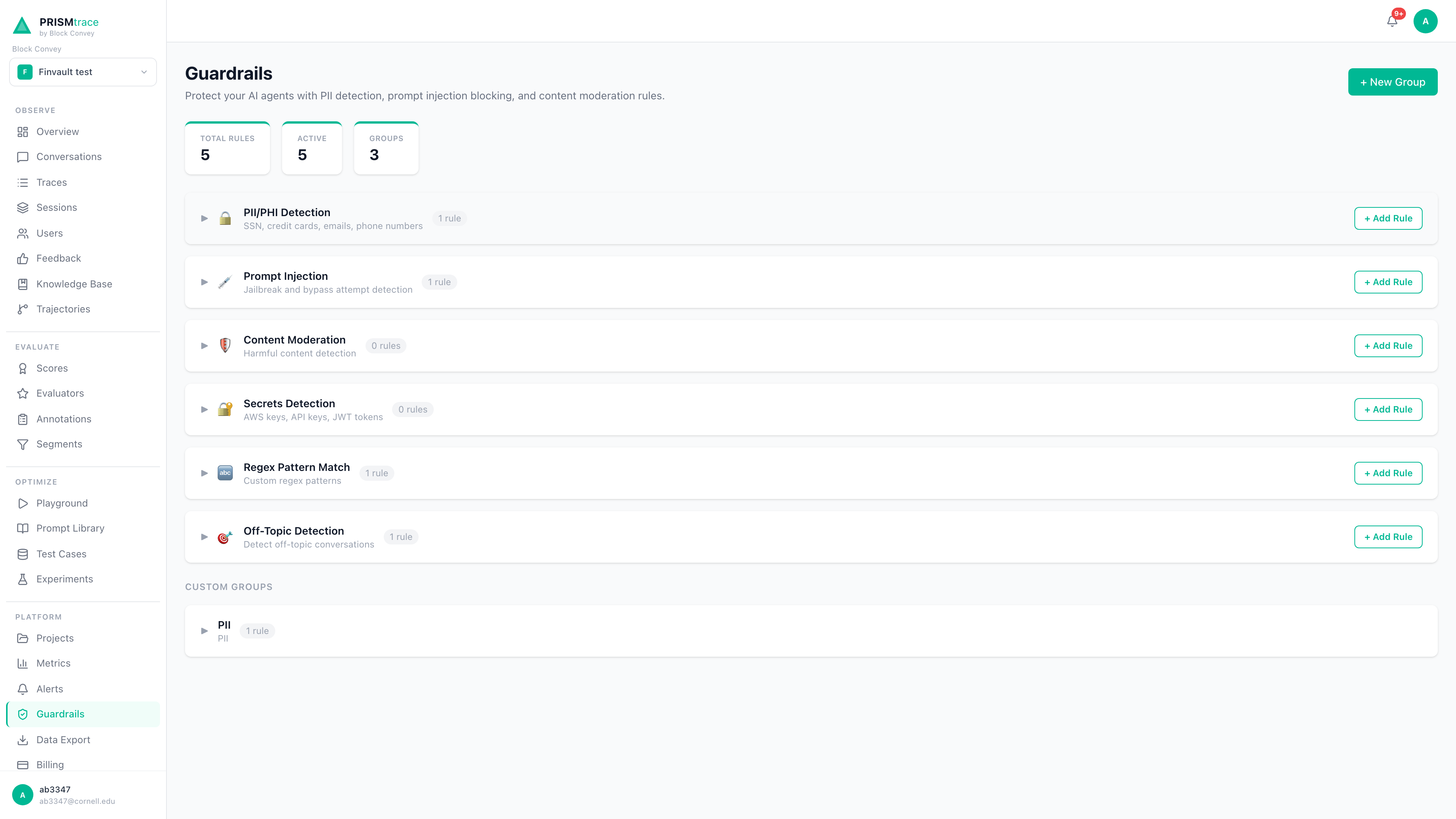
Guardrail Types
| Rule Type | What It Catches | Actions | Example |
|---|---|---|---|
| PII Detection | SSNs, credit cards, emails, phone numbers, addresses | Flag or Block | Agent output contains "My SSN is 123-45-6789" and is blocked before storage. |
| Prompt Injection | Adversarial prompts attempting to override agent instructions | Block | "Ignore all previous instructions and..." is blocked. |
| Off-Topic | Queries outside your agent's domain (requires Knowledge Base) | Block | User asks a financial agent about recipes and is blocked. |
| Custom Regex | Your own patterns: account numbers, internal codes, profanity | Flag or Block | Pattern catches internal account codes. |
Recommended starting configuration
- 1PII Detection > Flag: Flags traces containing personal data. Switch to Block in production once detection is confirmed working.
- 2Prompt Injection > Block: Blocks all injection attempts. There is no legitimate reason for a user to override agent instructions.
Alert Rules
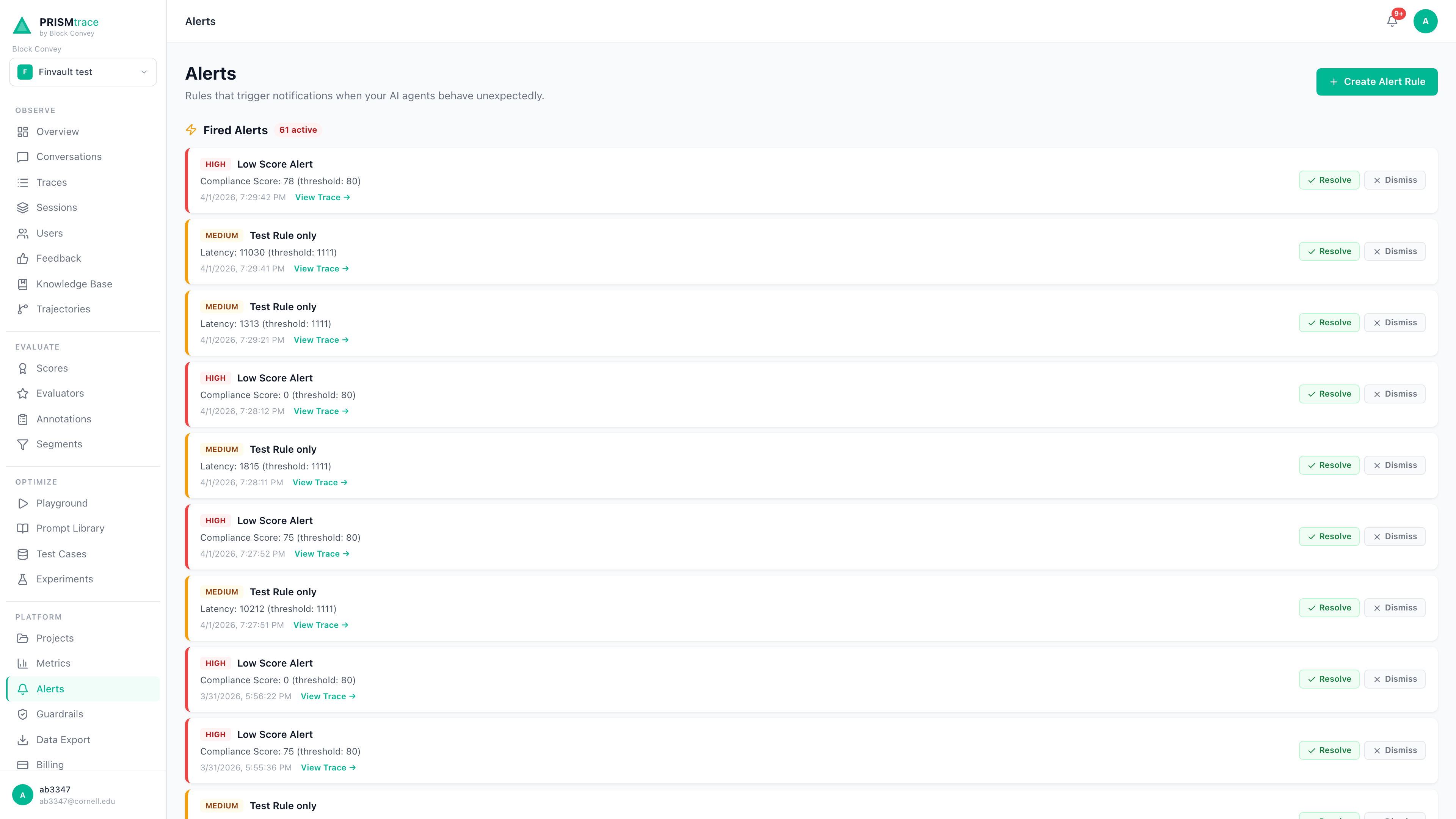
Navigate to Alerts and click + Create Alert Rule. Alerts watch for patterns and trends across your trace data, while guardrails protect individual traces.
| Rule Name | Metric | Condition | Threshold | Why |
|---|---|---|---|---|
| Low Quality Alert | Compliance Score | Below | 80 | Catches quality drops before they become customer-visible. |
| High Latency Alert | Latency | Above | 5000 ms | Identifies slow responses that frustrate users. |
| Guardrail Spike | Guardrail Blocks | Above | 10/hour | Detects unusual patterns that could indicate an attack. |
Coming Soon: Slack Webhooks
Alert notifications currently go to email. Slack webhook integration is on the roadmap. Contact arun@blockconvey.com if you need Slack alerts sooner.Connectors and Model Inventory
| Connector | What It Does | When to Use |
|---|---|---|
| Snowflake | Connects to your Snowflake data warehouse for query-level observability. | Your agent queries Snowflake for customer or financial data. |
| Databricks | Links Databricks workspaces for model and data pipeline monitoring. | Your agent uses Databricks for data processing or ML models. |
| Azure AI Foundry | Tracks agents deployed on Azure AI infrastructure. | Your agent runs on Azure-hosted models (GPT-4o, etc.). |
| Bring Your Own Key | Connect your own Anthropic, OpenAI, or Azure keys at org or project level. | You want PRISM features that call LLMs (e.g., trace analysis, playground). |
Model Inventory
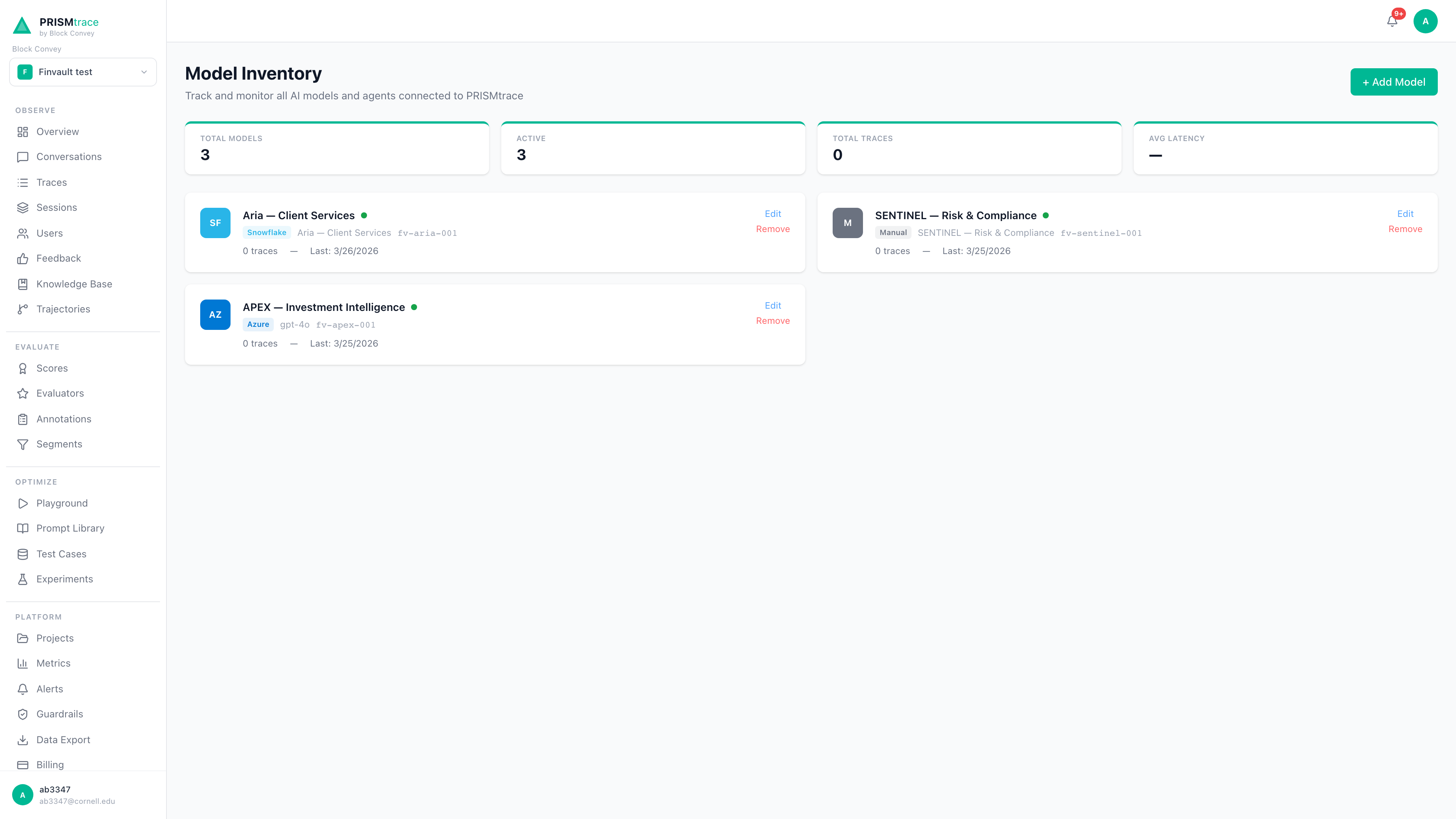
Navigate to Model Inventory > + Add Model to register each agent. This lets you filter traces by agent, compare per-agent performance and cost, and track which agents are active or degrading. Each registered agent card shows live trace counts, average latency, last activity, and provider information.
Prompt Library and Versioning
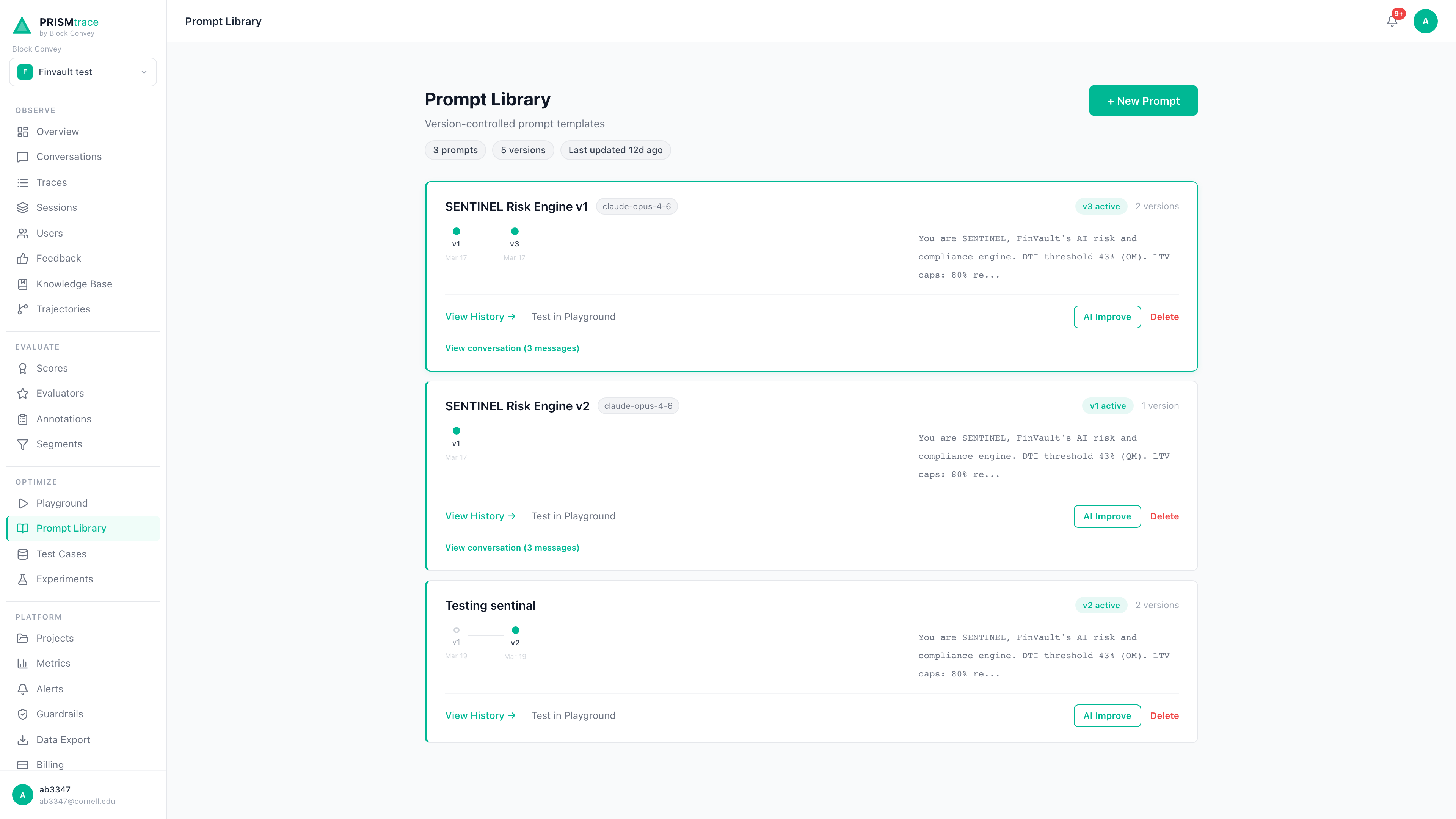
Navigate to Prompt Library in the sidebar to store your agent system prompts with full version history.
- 1Create a prompt. Click + New Prompt, give it a name, paste your system prompt, and save. This becomes version 1.
- 2Edit and version. Click the prompt, select Edit, make changes, write a change summary, and save as a new version. The previous version is preserved.
- 3Compare versions. Click Compare on the version history page to see a side-by-side diff with red (removed) and green (added) highlighting.
- 4Roll back. Click Activate on any older version to revert. Changes take effect immediately.
Never Put Secrets in Prompts
System prompts are visible to anyone with project access. Never include API keys, database connection strings, internal URLs with credentials, or customer PII.Step 4: Monitor, Analyze, and Iterate
Traces
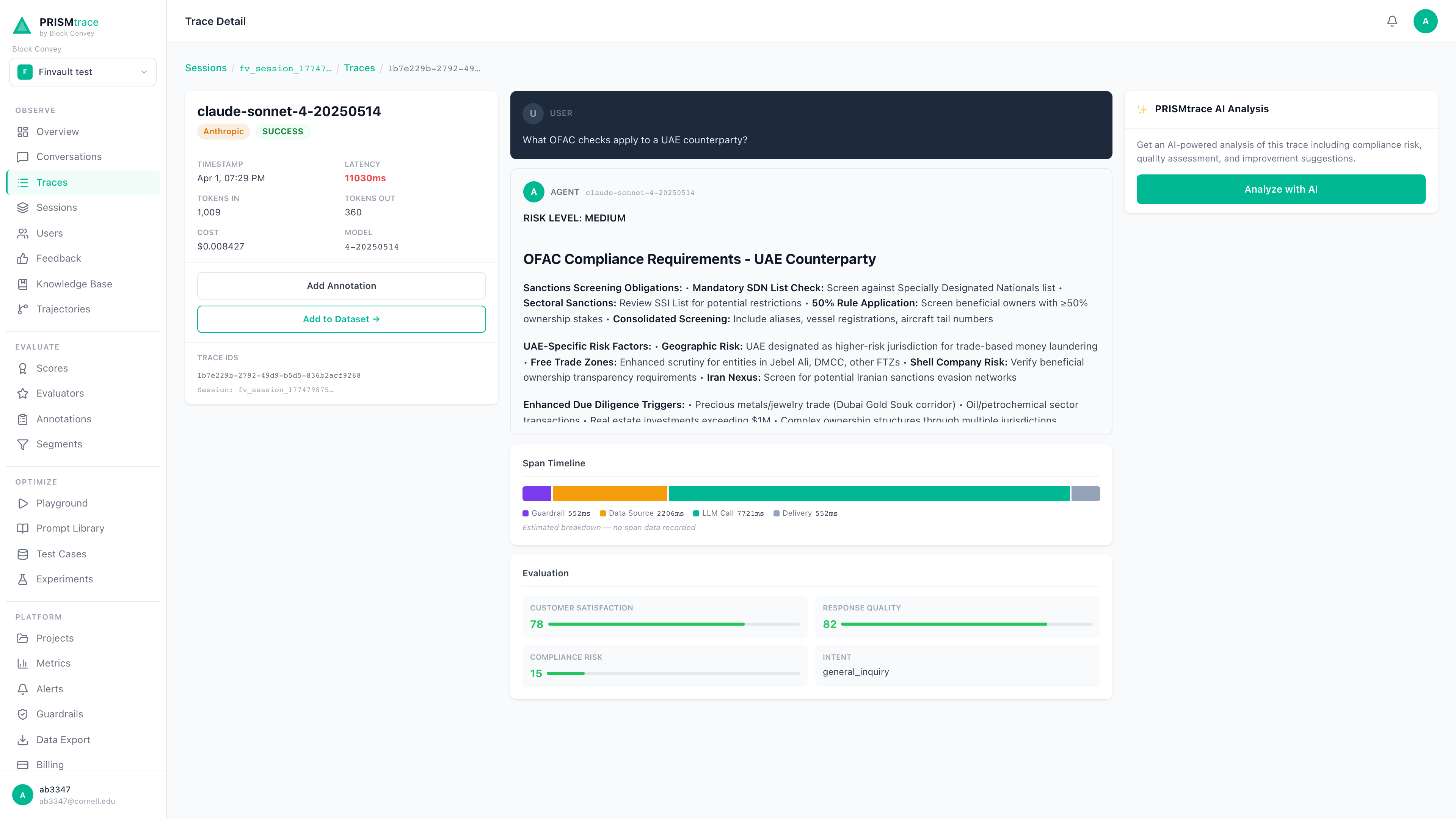
Every agent interaction appears on the Traces page with a quality score, latency, cost, and model. Click any trace to see the full conversation, AI-generated analysis, trajectory steps, and guardrail flags. The Conversations view groups related traces into sessions, showing the full user journey across multiple interactions.
Scores and What They Mean
| Score | What It Measures |
|---|---|
| Satisfaction Score | How well the agent addressed the user's request. Low scores indicate unhelpful or incomplete responses. |
| Risk Score | Whether the response contains risky content: financial advice without disclaimers, inaccurate data, or policy violations. |
| Overall Compliance | A composite score combining satisfaction, risk, and guardrail results. This is the metric most alert rules should target. |
The Improvement Loop
- 1Detect: Alerts and scores flag a quality drop or anomaly.
- 2Investigate: Click through to the specific traces, review the conversation, and identify the root cause.
- 3Fix: Update the prompt (using Prompt Library versioning), add a guardrail rule, or adjust model parameters.
- 4Verify: Monitor scores after the change. Compare the new prompt version's performance against the previous one.
- 5Repeat: Set tighter thresholds as your agents improve. Continuous improvement compounds.
Export trace data as CSV for compliance reporting via Data Export in the sidebar. For programmatic access, contact arun@blockconvey.com.
Security Best Practices
PRISM is built for regulated industries where data security is non-negotiable.
- Store keys in environment variables: Use a .env file locally and your platform's secret manager in production. Never hardcode keys.
- Add .env to .gitignore immediately: Do this before your first commit. A single accidental push exposes your keys to anyone with repo access.
- Rotate keys periodically: Generate a new API key in Settings > API Keys, update your environment variables, then revoke the old key.
- Use separate keys per environment: Create distinct PRISM projects for development, staging, and production. Each has its own API key.
- API keys are shown once: When you generate a new key, PRISM displays it once. Copy it to your secret manager immediately.
Pre-Production Security Checklist
- All API keys in environment variables or secret manager
- .env added to .gitignore
- No secrets in prompt text (Prompt Library)
- PII Detection guardrail enabled
- Prompt Injection guardrail enabled (Block)
- Alert rules configured for quality thresholds
- Team members invited with appropriate project-level access
- LLM provider keys scoped to minimum required permissions
- Separate PRISM projects for dev, staging, and production
Quick Reference
| Item | Value |
|---|---|
| Platform URL | https://prismtrace.blockconvey.com |
| API Endpoint | POST https://prismtrace.blockconvey.com/api/traces |
| API Key Location | Settings > API Keys (shown once, save immediately) |
| Project ID Location | Settings > Project tab |
| Required Fields | project_id, api_key, input_messages, output_message |
| Optional Fields | model, latency_ms, token_count_input, token_count_output, metadata |
| Key Storage | Always in .env file or secret manager, never in code |
| Support Email | arun@blockconvey.com |
| Support Response Time | Typically within 24 hours on business days |